For iPhone & Apple Watch
Know before you drink.
See what the next coffee will do to your sleep before you order it, and keep your water on pace while you're at it. Caffeine and water, balanced in one app.
Be first in line when it lands on the App Store. One email, no spam.
Before, not after
Plan the coffee, not the regret.
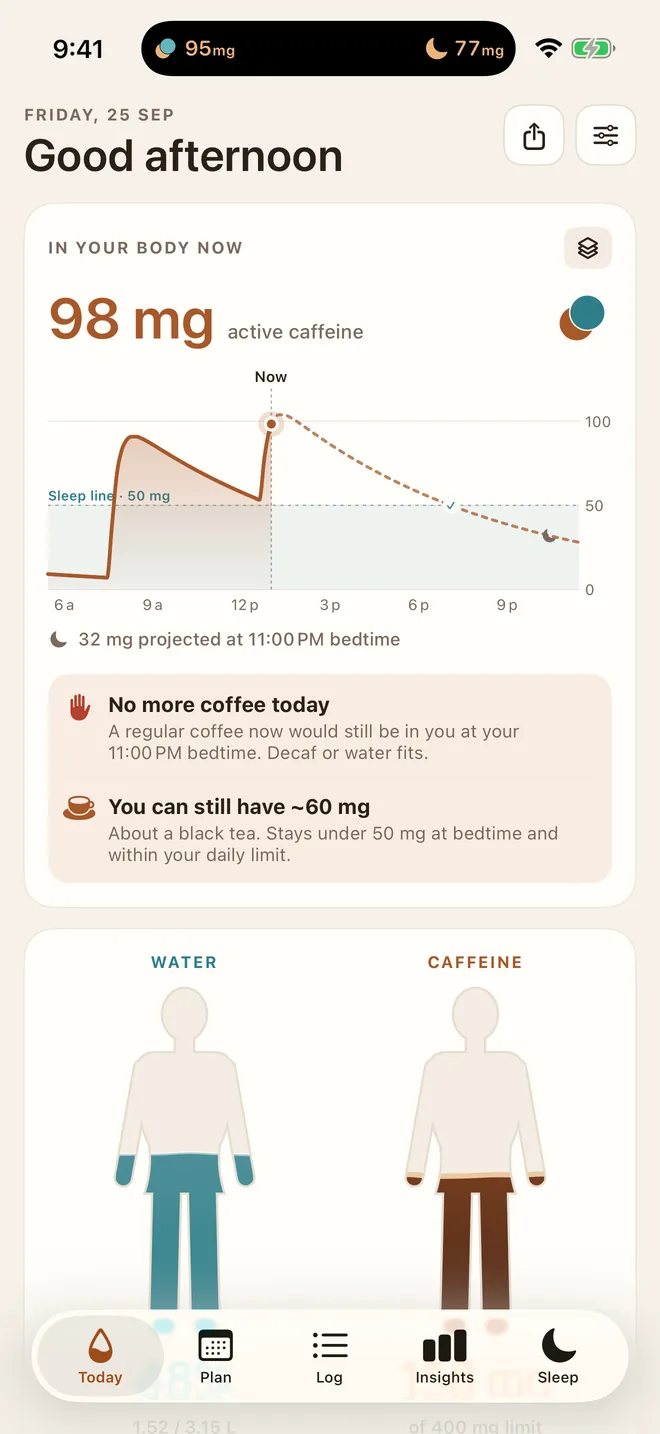
Most trackers tell you what already happened. Caffeine vs Water looks ahead: lay out the day's drinks and see exactly what's left in you at bedtime.
- ☕“You can still have ~60 mg”The biggest drink that still lets you sleep, right now. About a black tea.
- ⚠️A heads-up before it's too lateTap a drink that would push you past your bedtime target and it asks first, with a one-tap decaf swap.
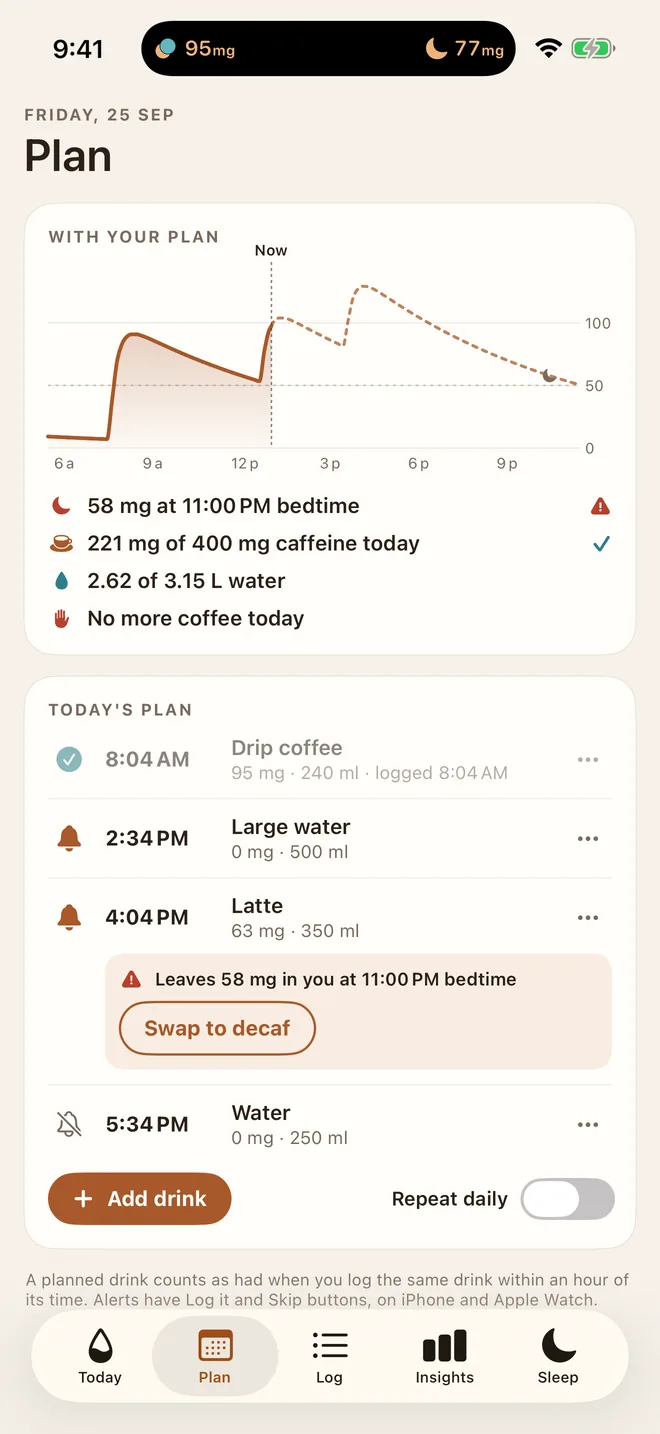
- 🗓A plan for the whole dayAdd the 4 pm latte ahead of time and get a reminder when it's due, on iPhone and Apple Watch.
Two sides of one habit
Caffeine and water, on one screen.
Every coffee pairs with a glass of water. Your water goal adjusts to your day, and two figures fill up as you drink, so the balance is obvious at a glance.
- 📈Caffeine in your body, hour by hourA live curve of active caffeine, each drink stacked in its own colour, projected to bedtime.
- 💧A water goal that fits youBased on your weight and activity, with a glass paired after strong coffees.
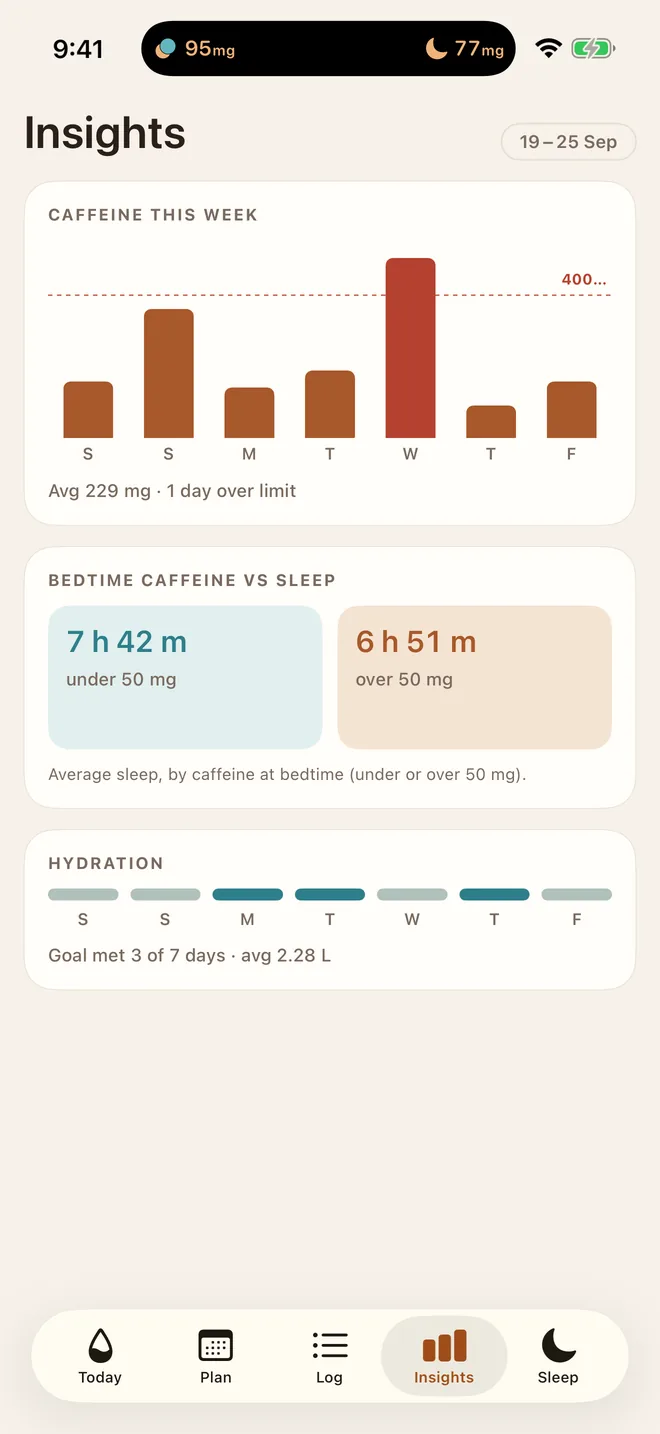
- 📊See what it does to your nightsInsights compare your sleep on low- and high-caffeine evenings, using Apple Health.
Sleep first
Your last coffee, worked out for you.
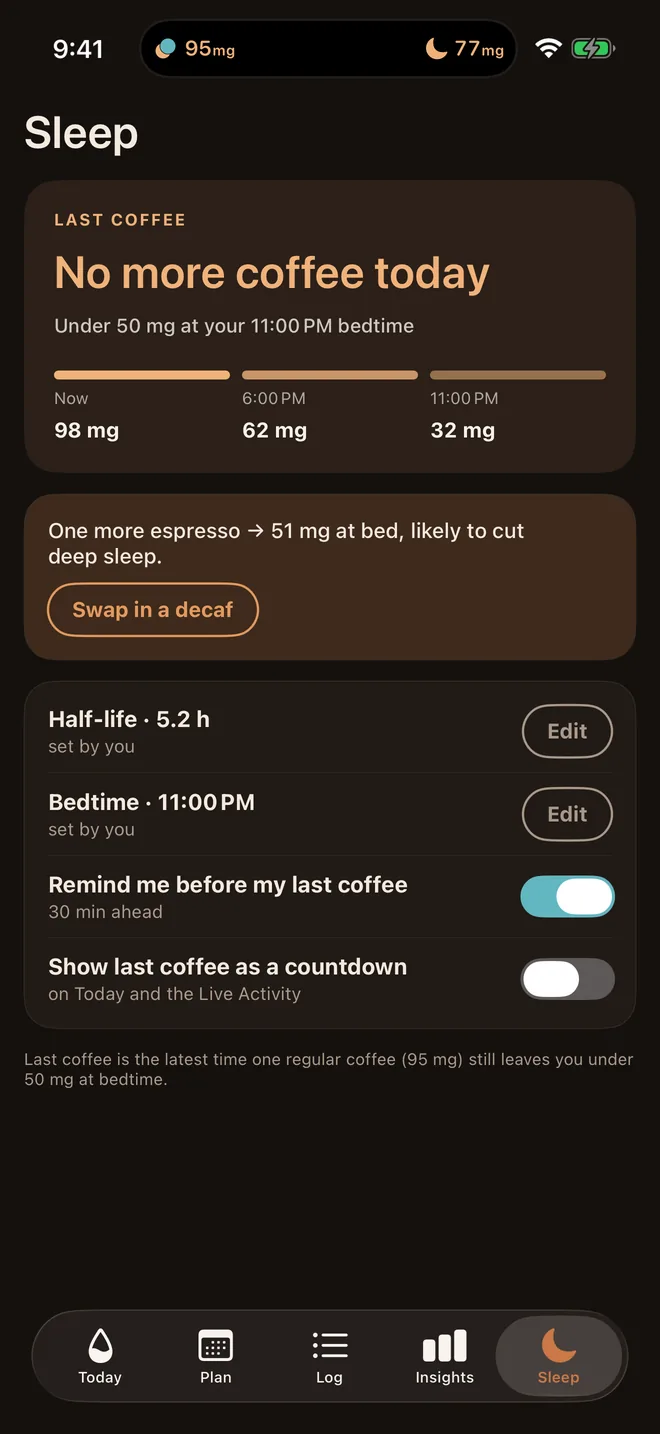
Set your bedtime once. The app works out the latest time a regular coffee still leaves you under 50 mg at lights-out, and reminds you before it passes.
- 🌙Tuned to how you process caffeinePresets for fast and slow metabolisers, smokers, the pill and pregnancy.
- ⏱A countdown when it mattersOn Today, in the Dynamic Island and on your Lock Screen.
Try it now
What will that coffee do at bedtime?
The same caffeine model the app uses. Pick a drink and a time.
Active caffeine from this one drink, with a one-compartment model (absorption half-life 10 min). The app adds up every drink in your day. General wellness information, not medical advice.
Logging that happens by itself
Two seconds, wherever you are.
The best tracker is the one you don't have to remember.
At your usual café
A nudge at your usual time or place, with one-tap logging. It stays quiet if you've already had your coffee.
Apple Watch
Log from your wrist, see active caffeine on a complication, and act on reminders without your phone.
Quick log
Your regulars one tap away. Touch and hold for a half, a double, or a drink you forgot to log earlier.
Siri & Control Center
“Log an espresso.” Or a control on your Lock Screen, without opening the app.
Live Activity & widgets
Caffeine and water in the Dynamic Island, on your Lock Screen and Home Screen.
646 drinks
Coffees, teas, sodas and energy drinks by brand and size, or add your own.
Honest and private
No account. No ads. No guesswork.
Your drinks stay on your iPhone and in Apple Health. There's nothing to sign up for and nothing to sell. And every number in the app comes with its source.
“Does coffee dehydrate you?” No.
For regular coffee drinkers, a moderate cup hydrates about as well as water. We pair a glass with strong coffee because it's a good habit and it keeps your goal honest, not because coffee is “cancelling out” your water.
Why 50 mg at bedtime?
Caffeine blocks the signal that makes you sleepy, and studies see sleep suffer even when you fall asleep fine. Staying under about 50 mg at lights-out is a sensible target. You can change it, and the app shows its working.
Questions
Good to know
When can I get it?
Caffeine vs Water is in testing now and coming to the App Store soon. Join the waitlist and we'll email you once, on launch day.
What does it need?
An iPhone on iOS 26 or later. The Apple Watch app is optional and needs watchOS 26.
Will it cost anything?
Logging, the caffeine curve, your last-coffee time, bedtime warnings and your water goal will be free. Anything that protects your sleep or health stays free. An optional Pro upgrade adds the extras, with no ads and no weekly subscriptions.
Do I need an account?
No. There's no sign-up. Your drinks are stored on your iPhone, synced to your Apple Watch, and optionally written to Apple Health.
I'm pregnant. Can I use it?
Yes. Choose the pregnancy preset and the app uses a much longer half-life and a 200 mg daily limit. It's general wellness information, not medical advice, so check your own limit with your doctor or midwife.
How accurate is it?
It uses a standard pharmacokinetic model with a half-life you can tune. Everyone is different, so treat the numbers as a well-informed estimate, and adjust the half-life if caffeine hits you harder or softer.
Coffee now. Sleep later.
Get an email the day Caffeine vs Water lands on the App Store.
We only use your email to tell you about the launch. Privacy